
Is Crunchyroll Worth It in 2026?
An honest cost-vs-catalog verdict — real prices, real tiers, no made-up numbers. Every claim checked against the current plans.
Every anime fan eventually asks the same question: is Crunchyroll worth it 2026, or is it just the service everyone defaults to? The honest answer is that it depends entirely on how you watch — and most “worth it” guides online will not give you that answer, because they get the basic facts wrong. Some still price the decision at a tier that does not exist. Others treat a free tier that ended on December 31, 2025 as if it were still a live alternative. If you decide based on those guides, you are deciding based on fiction.
This guide does the math properly, and it does something no competing guide does: it merges everything the top-ranked “worth it” pages actually cover — their verdicts, their price tables, their app complaints, their device lists, their store perks — and then adds the data none of them cover. It uses Crunchyroll’s real 2026 prices, works out what a subscription costs per day and per hour of actual watching, tests the video quality claims, walks through the app experience, and gives a different verdict for each kind of viewer: the daily watcher, the seasonal follower, the casual fan, and the household. It also says plainly who should not subscribe at all — because for some viewers, the honest answer really is no.
Prices, trial terms and tier features in this guide were checked in October 2026. Where other guides disagree with the prices below, they are out of date — the section on stale guides names the worst offenders.
- What you actually pay in 2026
- What you get for the money
- Video quality: what 1080p really looks like
- The app experience: profiles, lists, and activation
- The cost math: monthly vs annual, per day, per hour
- The verdict by viewer type
- Who should NOT subscribe
- The downsides nobody mentions
- What Crunchyroll does not have
- The 2026 season lineup
- Crunchyroll vs the alternatives
- How to pay less without falling for fake deals
- Store perks and bundle math nobody else totals up
- Try it for 7 days: check these 5 things
- Why so many “worth it” guides get the price wrong
- Is Crunchyroll worth it: FAQ
- The bottom line
What You Actually Pay in 2026
Crunchyroll is subscription-only in 2026. The free ad-supported tier ended on December 31, 2025, and there is no free way to watch the catalog anymore. Funimation and VRV, which older guides still mention as alternatives, are both shut down — Funimation’s library was absorbed into Crunchyroll after the 2022 merger, and VRV was folded back into Crunchyroll on May 8, with existing members’ watchlists and watch history carried over but no Mondo or VRV Select exclusives hosted. Anyone weighing Crunchyroll in 2026 is choosing between three paid tiers:
| Plan | Monthly price (US) | What it adds |
|---|---|---|
| Fan | $9.99 | Full catalog, ad-free, simulcasts, one stream |
| Mega Fan | $13.99 | Everything in Fan, plus offline downloads and up to four simultaneous streams |
| Ultimate Fan | $17.99 | Everything in Mega Fan, plus the Crunchyroll Manga add-on and extra member perks |
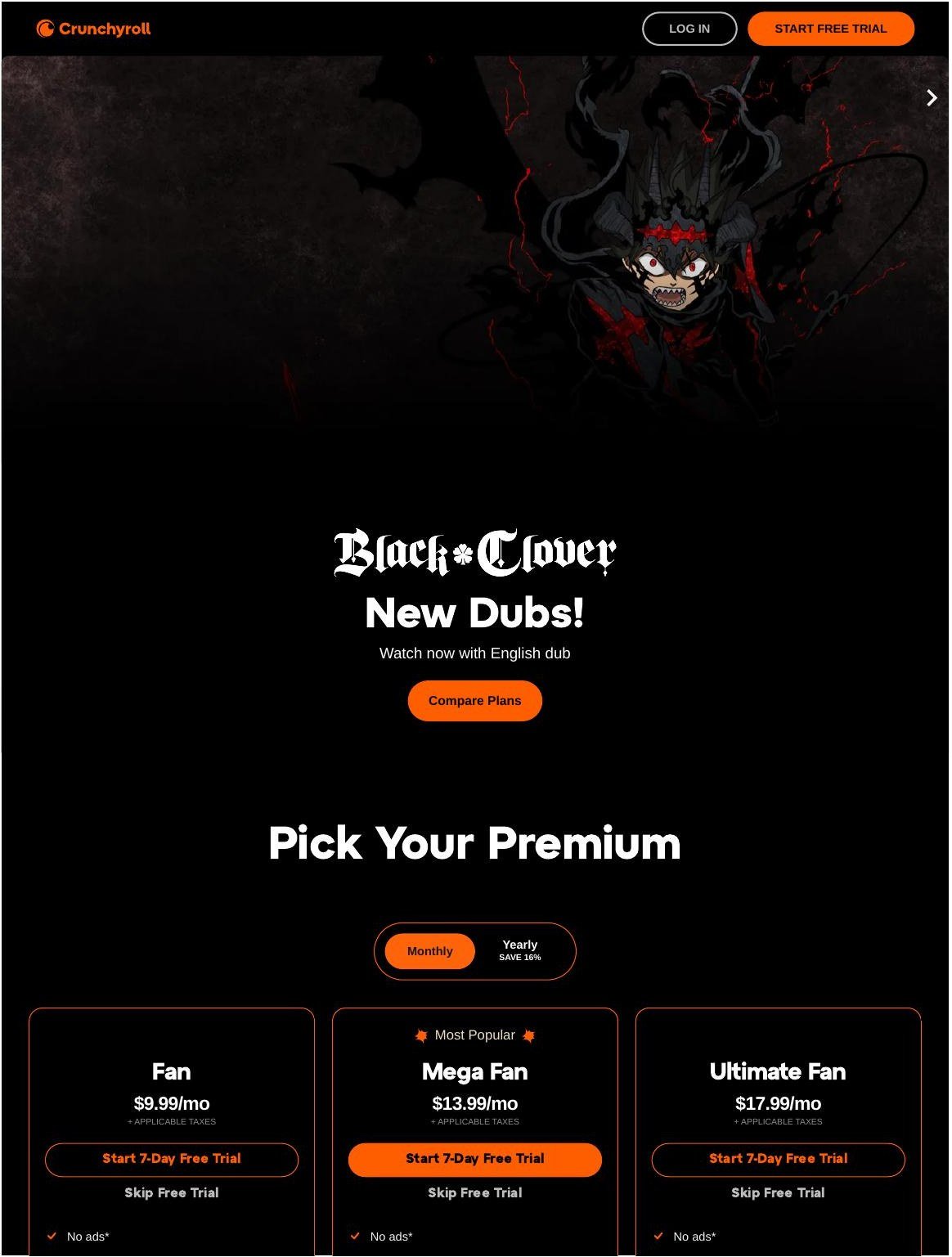
Annual billing cuts roughly 16% off the monthly rate on each tier — about two months’ worth of savings across a year. That discount matters more than it looks, as the cost math below shows. Note also that there is no student plan and no family plan: students and households save through the methods in the “pay less” section, not through a special tier. If a site promises you a student or family discount code, it is selling you something that does not exist.
One more pricing trap to avoid: several “worth it” guides still in circulation price the decision at “$14.99/month” — a tier that has never existed. Others tell you to weigh Crunchyroll against its free tier. Both errors come from guides that have not been updated since the price changes and the end of the free tier, and both make the value calculation wrong before it even starts. The section on stale guides below names the worst offenders.
What You Get for the Money
The catalog. Crunchyroll’s library runs to more than 1,300 series — the largest dedicated anime catalog of any legal streaming service, and over 2,000 titles by the app store’s own count, with more than 45,000 episodes in some counts. That scale is the core of the value proposition: if you watch anime broadly rather than following one or two famous titles, no general service matches the depth, especially for simulcasts.
Simulcasts. New episodes of currently airing Japanese series typically appear on Crunchyroll within about an hour of their Japanese broadcast, with subtitles. For viewers who follow seasonal anime and want to be part of the conversation as it happens, this is the feature that no competitor fully replaces. Waiting weeks for a series to appear elsewhere is a different experience, and for many fans it is the whole reason to subscribe. A seasonal simulcast calendar also helps you track the day-by-day schedule.
Subs and dubs. Most series are available subtitled, and a large share of popular titles also carry English dubs, often released weeks after the subtitled version — sometimes same-day for major hits. Dub viewers should check individual titles rather than assuming a dub exists — dub availability varies by series and can change as licenses rotate. Crunchyroll now produces many English dubs in-house, and its dub library deepened considerably after the Funimation merger.
Offline viewing and multiple streams. Offline downloads are a Mega Fan and Ultimate Fan feature, which matters if you watch on commutes or flights. Simultaneous streams are tier-dependent too: Fan covers one stream, Mega Fan up to four, Ultimate Fan up to six. A household sharing one account needs to factor this in, not just the headline price. One honest complication: a few 2026 guides claim the Fan tier now includes offline downloads on one device, while Crunchyroll’s own app listing still limits downloads to Mega Fan and Ultimate Fan. Until the plan page itself says otherwise, treat downloads as a Mega Fan feature — and check the current plan page before you buy if offline viewing on Fan is the deciding factor for you.
Profiles. Crunchyroll now offers individual user profiles — up to five per account, with anime-character avatars — so sharing no longer means losing your progress when someone else watches. One caveat reported by reviewers: profiles do not isolate watchlists perfectly, so expect some bleed-through between household members’ lists.
Manga. The Ultimate Fan tier includes a manga add-on. If you already read manga digitally, that bundle has real value; if you do not, it is not a reason to pay for the top tier. Our Crunchyroll manga app guide covers what the add-on actually includes. The Crunchyroll Store, meanwhile, sells officially licensed collectibles, clothing, vinyl, books, and accessories — relevant because the store discounts below are a real, if secondary, perk.
Game Vault. Mega Fan and Ultimate Fan also include Crunchyroll Game Vault, a rotating catalog of mobile games bundled with the subscription — including titles like River City Girls, Behind the Frame, STEINS;GATE, Corpse Party, and Shantae and the Seven Sirens, with no ads or in-app purchases. Some games are also available to all subscribers, but the Vault itself is a Mega/Ultimate perk. It is a genuine extra for mobile gamers, but it is not a reason to pick a higher tier on its own — judge the tier on streams, downloads and manga first, and treat Game Vault as a bonus. Reviewers are split on the Vault’s quality: some call the games average at best.
Music videos and concerts. A smaller extra that no “worth it” guide mentions: the app also carries exclusive music videos, concert footage, behind-the-scenes features, and curated playlists built around anime soundtracks and J-pop. If that matters to you, it is a genuine bonus; for most viewers it is a footnote.
Devices. Crunchyroll runs on the platforms most viewers actually own: Roku, Fire TV, Apple TV, Android TV, PlayStation, Xbox, Nintendo Switch, iOS and Android, with Chromecast and AirPlay support. If your main screen is covered, the experience is consistent; if you watch on an unusual setup, check the device list before subscribing rather than after. The full device picture — including the gaps — is in the app experience section below.
What you do not get. Crunchyroll is anime-only. It does not carry live-action series, films outside anime, sports, or general entertainment. If your household wants one service that does everything, Crunchyroll cannot be that service — and judging it as if it should be is the most common reason people call it “not worth it” when the real problem is that they bought the wrong kind of service.
Read next: Crunchyroll Plans Explained
Video Quality: What 1080p Really Looks Like
No Crunchyroll plan offers 4K streaming — the ceiling is 1080p, and every tier gets the same quality. That single fact corrects a surprising number of competing guides, and it frames everything else in this section: you are not paying more for sharper video, you are paying for streams, downloads, manga, and games.
The bitrate problem. The most detailed competing review tested Crunchyroll’s output across titles and devices and found the real issue is not resolution but bitrate inconsistency. Action sequences stream at higher quality while dialogue scenes drop noticeably, with compression artifacts in gradients and crowd scenes, especially on darker titles. Netflix’s anime catalog, by contrast, held steadier quality across equivalent scenes. The same reviewer reported buffering and quality dips during prime evening hours even on a 100 Mbps connection, and automatic downgrades to 720p on connections under 50 Mbps. Anime’s flat color fields and limited dialogue animation mean the difference between 720p and 1080p is less dramatic than for live-action — one reviewer concluded the 1080p upgrade is only clearly visible on a large TV of 50 inches or more or a dedicated PC monitor, and on phones and tablets 720p looks sharp.
Older titles cap lower. Not every title reaches 1080p at all. Older anime and some catalog titles top out at 720p, and Crunchyroll does not surface that clearly in the app — you discover it only when you try to stream. If your watchlist leans heavily on classics, expect 720p more often than the spec sheet suggests.
What you can control. Crunchyroll auto-selects 1080p or 720p, but you can pick manually — all the way down to 240p if you are worried about data usage. A competing guide recommends at least 25 Mbps for the best anime streaming experience, which lines up with the peak-hour dips above: on a slow connection, expect the service to protect playback by dropping quality rather than by pausing. Test on your own setup during the trial rather than trusting a review written on someone else’s hardware.
The App Experience: Profiles, Lists, and Activation
Crunchylists. Crunchyroll’s most distinctive organizational feature is its Crunchylist system: beyond a traditional watchlist, you can build custom lists — up to ten per account — for example only currently airing simulcasts, or only isekai fantasy. You can also browse Crunchyroll’s hand-curated lists, which carry playful titles. The catch reported by reviewers: you cannot browse just the curated lists on their own; you are subject to the algorithm’s “Top Picks For You” and Crunchyroll News. One practical tip from the same review: to keep up with new simulcasts, add currently running shows to your watchlist and sort it by “Recent Activity” — but that trick does not work for Crunchylists.
Usability problems, honestly reported. The app draws regular criticism. One reviewer needed three tries to find the video-quality setting on an older Roku device, saw the iOS interface lag during search and occasionally crash when switching between dubbed and subbed versions of the same show, watched the watchlist fail to sync reliably across devices, and saw resume playback sometimes reset to the beginning of an episode. Subtitle options are a genuine plus — multiple languages with timing adjustments — but the default interface is cluttered with recommendations, and search often misses exact title matches on the first try. Another review adds interface clutter and limited subtitle options to its cons list. None of this is a deal-breaker on its own, but it is the gap between Crunchyroll and Netflix’s smoother, more stable playback engine.
Activation. When you log in on a new device, Crunchyroll gives you a six-digit code; type it at crunchyroll.com/activate in any already-logged-in browser and the device links. Device activation steps are similar across platforms: install the app, sign in, note the code, enter it on the activation page. If you set up on Roku, Xbox, or a smart TV, expect this flow rather than typing a password on the TV itself.
Devices, with the gaps. Crunchyroll is available on Fire TV devices, Android phones and tablets, Android TV, Apple TV (4th generation and 4K), Chromecast and Chromecast with Google TV, iPhones and iPads, Nintendo Switch, NVIDIA SHIELD Pro, PC and Mac browsers, PlayStation 4 and 5, the full Roku line, select Vizio TVs, and Xbox One. It is not available as a native app on LG or Samsung smart TVs, Facebook Portal, Echo Show, TiVo Stream, or Xfinity X1 — if you rely on those, you will need a console or streaming stick instead. The Wii app was discontinued in 2019.
How big the app actually is. Independent app-store data puts Crunchyroll’s Android app at 260 million total installs, with about 5.1 million installs in the last 30 days (roughly 170,000 a day), a 4.62-star rating from about 3.9 million ratings, and a top-3 grossing position in US entertainment. The app is 121.82 MB, requires Android 5.0 or higher, carries a medium-maturity content rating, and was last updated to version 3.126.0 on October 21, 2026, with near-weekly updates through the autumn. That scale is part of the value case: this is not a niche app that might vanish, it is one of the most installed entertainment apps on the platform.
The Cost Math: Monthly vs Annual, per Day, per Hour
Monthly prices look small, which is exactly why they mislead. The honest way to judge a subscription is to convert it into the units you actually experience: per day, and per hour watched.
| Plan | Monthly | Annual (approx., ~16% saving) | Per day (annual) |
|---|---|---|---|
| Fan | $9.99 | ~$100/year | ~$0.27 |
| Mega Fan | $13.99 | ~$140/year | ~$0.38 |
| Ultimate Fan | $17.99 | ~$180/year | ~$0.49 |
Per day, even the top tier costs less than fifty cents on annual billing. The real question is per hour watched, because that is where viewing habits split the verdict wide open:
- Daily watcher (1 hour a day, ~30 hours a month): Fan costs about $0.33 per hour monthly, about $0.28 per hour on annual billing. That is cheaper than any other legal way to watch that much anime.
- Weekly watcher (one series, ~4 hours a month): Fan costs about $2.50 per hour monthly. Still reasonable for a hobby, but no longer obviously cheap — and a single gifted month beats a standing subscription if your watching comes in bursts.
- Occasional viewer (one film or a few episodes, ~2 hours a month): Fan costs about $5.00 per hour. At that point you are paying a standing subscription for something you barely use, and the honest answer is to stop paying between the shows you actually want.
The pattern is simple: the more you watch, the better the deal gets, and it gets dramatically better. A subscription that is a bargain at an hour a day is a waste at an hour a month. Most people who feel Crunchyroll “isn’t worth it” are in the second or third group but paying as if they were in the first.
Cost per show is another useful lens, and one no competing guide covers. A Fan subscriber who finishes four series a month pays about $2.50 per series; at two series a month, about $5.00 per series; at one series a month, the full $9.99. That is the math that turns a “cheap” subscription into an expensive one without the viewer noticing — the price never changes, but the value per show halves with every show you do not watch. A related heuristic from one competing review makes the same point differently: one simulcast series per season (roughly 12-13 episodes) plus casual back-catalog browsing works out to under $2 per episode, and seven new episodes cost about the same as a single anime Blu-ray at $25-$35.
The Verdict by Viewer Type
One caveat before the table, from the strongest competing guide: a huge global library provides little value if the particular shows you want are not licensed in your country. Check the titles you care about first — the verdict below assumes they are available to you.
| Viewer type | Verdict | Best tier |
|---|---|---|
| Daily watcher — anime most days, follows simulcasts | Yes, clearly worth it. The simulcast catalog alone justifies it, and the per-hour cost is tiny. | Fan, or Mega Fan if you download or share screens |
| Seasonal follower — watches a few series each season | Yes, with a strategy: subscribe for the seasons you follow, or pay annually so quiet months cost less. If you watch only one or two anime a year, skip the standing subscription entirely and subscribe only during the seasons that interest you. | Fan (annual if you watch most of the year) |
| Casual fan — one series every month or two | Not as a standing subscription. Buy a single month (a gift card works well) when a show you want is airing, then stop. | Fan, month by month |
| Household — two or more viewers, possibly including teens | Yes, at Mega Fan: four simultaneous streams and offline downloads make the per-person cost low. Set up teen profiles and PINs for younger viewers. | Mega Fan |
| Dub-only viewer | Worth it for popular titles, but check dub availability for the specific series you want first — dubs lag subtitles by weeks and not every title gets one. | Fan |
| Manga reader | Ultimate Fan only makes sense if you actually use the manga add-on; otherwise Mega Fan covers everything else. | Ultimate Fan (only if you read manga) |
If you only remember one row, remember the household row: Mega Fan’s four streams split across two viewers bring the per-person cost below $7 a month, which changes the value calculation completely. Our account sharing guide explains how streams and profiles work in practice, and what the rules actually allow.
Who Should NOT Subscribe
An honest verdict has to include a no. Crunchyroll is not worth it for everyone, and the honest guides — the ones that get the facts right — agree on the same list of exceptions:
- You only watch famous titles you can find elsewhere. If your anime diet is a handful of famous series that also stream on Netflix, Hulu, or Max, you are paying $9.99 a month for a simulcast feed you will not use.
- You watch fewer than a couple of hours a month. At two hours a month, Fan costs about $5.00 per hour — more than renting a film. Buy a single month when something you want is airing instead.
- You only watch dubs of niche series. Dubs lag subtitles by weeks, and many catalog titles never get English dubs at all. If you will not watch subtitled anime, check the dub status of the specific shows you want before paying.
- You want 4K video. Crunchyroll tops out at 1080p on every tier. If 4K matters to you, you are paying for a ceiling you do not want.
- You already subscribe to a service that covers your anime. If your household already pays for a service whose anime selection satisfies you, adding Crunchyroll duplicates what you already have.
- You need the free tier. It ended on December 31, 2025. There is no free tier to fall back on — if the subscription does not fit your budget, it does not fit.
The pattern: Crunchyroll earns its price from depth and speed — the size of the catalog and how fast new episodes arrive. If you do not use either, you are paying for a firehose and drinking through a straw.
The Downsides Nobody Mentions
Most “worth it” guides are advertorials: they list features and call it a verdict. The actual user complaints, collected from reviews and app-store feedback, are worth knowing before you pay:
- Video quality that underwhelms videophiles. The 1080p ceiling is real, but the bitrate is the actual complaint — action scenes in some titles show visible compression. If pristine image quality matters to you, test during the trial.
- An app that frustrates. Navigation complaints recur: burying the video-quality setting, inconsistent behavior across devices, subtitles that sometimes need toggling. It works, but it is not a polished experience.
- Dub delays and gaps. English dubs arrive weeks after subtitled premieres, and many older or niche titles never get dubs. Sub-only viewers do not care; dub-only viewers should check their shows first.
- Regional licensing holes. The global catalog numbers are misleading — what you can actually watch depends on your country, and some flagship titles are missing in specific regions.
- The price only goes one way. Crunchyroll has raised prices before, and the 2025 increase (Fan from $7.99 to $9.99) is the reason half the internet’s “worth it” guides are wrong. Budget for the possibility of more.
The balanced read, from the most detailed competing review: about 82% customer satisfaction, with the complaints concentrated on the app and video quality rather than the catalog. The library is the reason people stay; the software is the reason they grumble.
What Crunchyroll Does Not Have
A “worth it” verdict has to account for what the money does not buy. Crunchyroll is an anime-only service: no live-action series, no general films, no sports. If your household wants one subscription that covers everything, this is not it.
It also lacks 4K streaming on every tier, and — the fact that trips up the most buyers — it lacks a free tier. The free ad-supported tier ended on December 31, 2025. Guides that still describe it as a current option are simply out of date.
What it also lacks, quietly, is a student discount, a pause feature, and a mid-tier: the jump from Fan ($9.99, one stream, no downloads) to Mega Fan ($13.99, four streams, downloads) is the meaningful choice, and Ultimate Fan’s manga add-on only pays off if you actually read manga.
The 2026 Season Lineup
One honest guide framed it well: the Crunchyroll value question is really a calendar question. A subscription is worth more in a season full of shows you follow, and less in a quiet one. Here is the 2026 context:
Winter 2026. The winter season brings the usual heavyweight returning series alongside new adaptations. Simulcast timing — episodes within about an hour of the Japanese broadcast — is the main reason seasonal followers subscribe, and winter is when that matters most.
Spring 2026. Spring is historically the biggest season for new anime, and 2026 is no exception. If you follow more than two or three series in a season, the seasonal math is straightforward: one month of Fan ($9.99) covers the whole season’s simulcasts for less than the cost of two movie tickets.
Anime Expo 2026. Industry announcements at the summer convention set the tone for the fall and winter slates. If you are on the fence, the trial-test section below gives you a seven-day method for deciding with your own viewing habits instead of a reviewer’s.
Crunchyroll vs the Alternatives
No service exists in a vacuum. The real question for many viewers is not “is Crunchyroll worth it” but “is Crunchyroll worth it instead of something else.” The honest comparison:
| Service | Anime depth | Price (approx.) |
|---|---|---|
| Crunchyroll | Deepest dedicated catalog; same-day simulcasts | Fan $9.99/mo |
| Netflix | Strong on famous titles; thinner on seasonal depth | Varies by plan |
| HIDIVE | Niche catalog with exclusives; smaller library | Lower than Crunchyroll |
| Hulu | Decent anime selection bundled with general TV | Varies by plan |
| Amazon Prime Video | Some anime bundled with Prime; not a focus | Bundled with Prime |
| Max | Studio Ghibli and select titles; small anime shelf | Varies by plan |
| Tubi | Free with ads; older and niche titles | Free |
| RetroCrush | Classic anime; free with ads | Free |
Netflix deserves the deep comparison, because it is the alternative most viewers actually consider. Our Crunchyroll vs Netflix for anime guide covers it in full. The short version: Netflix’s anime shelf is strong on famous titles and originals, and its production values are excellent — but its seasonal depth is thinner, new episodes arrive slower, and the dedicated-anime catalog is a fraction of Crunchyroll’s. If you watch anime daily or follow seasonal series, Crunchyroll is the better buy. If you watch one famous title every few months and already pay for Netflix, you may not need Crunchyroll at all.
HIDIVE is the interesting niche alternative: a smaller service with exclusive licenses to titles Crunchyroll does not carry. Some anime fans subscribe to both — Crunchyroll for breadth, HIDIVE for its exclusives. Our HIDIVE vs Crunchyroll comparison covers when that combination makes sense.
The rotation strategy: if you are a seasonal follower, you do not have to keep every subscription year-round. Subscribe to Crunchyroll during the seasons you follow, and let the general services cover the gaps. Several of the most honest competing guides recommend exactly this.
The head-to-head bottom line: for anime-first viewers, Crunchyroll wins on depth and speed. For general viewers who occasionally watch anime, the service they already pay for is usually enough. The verdict depends on which viewer you are — which is why this guide gives a verdict per viewer type instead of one answer for everyone.
How to Pay Less Without Falling for Fake Deals
There are legitimate ways to pay less, and a minefield of fake ones. The legitimate list is short:
1. Annual billing. The single biggest real saving: roughly 16% off every tier. If you watch most weeks of the year, annual billing is the cheapest honest price for the service.
2. Gift cards. Crunchyroll gift cards, bought from legitimate retailers, let you pay for a month or more without a card on file — and they are the cleanest way to run a single-month burst subscription. Our gift card guide covers where to buy them and how to redeem them safely.
3. Subscribe only when you watch. The rotation strategy from the alternatives section is a saving in itself: a seasonal follower who subscribes for six months instead of twelve pays half the annual price for nearly all the value.
4. Check for a real student discount — but do not expect one. There is no standard Crunchyroll student discount in 2026. Student platforms occasionally list limited-time Crunchyroll promotions, but they are temporary and regional. Our student discount guide tracks what actually exists, because several “worth it” guides invent discounts that do not.
What does not work. “Free premium account” generators, shared-password marketplaces, and sites selling access to a “student code” are scams — and the stale-guides section below documents how many of the internet’s “worth it” guides quietly promote invented discounts. If a deal sounds too good to be true, it is priced against a tier that does not exist.
Store Perks and Bundle Math Nobody Else Totals Up
Crunchyroll’s extras are easy to dismiss and easy to undervalue. Mega Fan and Ultimate Fan include periodic Crunchyroll Store discounts on officially licensed merchandise — figures, apparel, manga volumes. If you buy merch anyway, a single discounted figure can offset a month or more of the Mega Fan premium over Fan.
The bundle math, totaled honestly: Mega Fan costs $4 more a month than Fan. Four simultaneous streams and offline downloads are the headline features, but the store discounts, the Game Vault mobile games, and the manga add-on (Ultimate Fan, $4 more again) are real value if you use them — and real waste if you do not. Run your own total before upgrading.
Carrier and bundle plans are the other side of the math. Some mobile carrier plans bundle streaming services, and some households already pay for a service whose anime selection satisfies them. Check what you already pay for before adding another subscription — the cheapest subscription is the one you do not need.

Try It for 7 Days: Check These 5 Things
Crunchyroll offers a 7-day free trial — not 14 days, despite what several stale guides claim. Seven days is enough to run a proper test if you know what to check. Do these five things before the trial ends:
- Watch a simulcast episode the day it airs. This is the core product. Check that new episodes appear promptly and that the subtitle timing is right.
- Test the video quality on your biggest screen. Watch an action-heavy episode and look for compression artifacts. If the bitrate bothers you here, it will bother you every day.
- Check your specific shows. Search for every series you actually want to watch. Confirm they are licensed in your country, and check whether the dubs exist if you need them.
- Try the app on every device you own. Install it on your TV, phone, and console. Test the six-digit activation, the video-quality setting, and subtitle behavior on each.
- Decide on day six, not day seven. Set a reminder. Memberships auto-renew, and the cancellation path (web: My Account, then Membership Plan, then Cancel Membership) is easy to find when you are not in a hurry.
The pass/fail rule: if all five checks pass, subscribe with confidence — you are the viewer the service is built for. If two or more fail, wait for the season that changes the answer.
Trial and cancellation mechanics, plainly: the trial is 7 days, it requires a payment method, and it converts to a paid membership unless you cancel. Cancel through the web (My Account, then Membership Plan, then Cancel Membership), through iPhone settings (Apple ID, then Subscriptions), or through the Android Play Store (Payments and subscriptions, then Subscriptions). Remember that memberships auto-renew unless turned off at least 24 hours before renewal.
Gift Cards: Where to Buy and How to Redeem
Why So Many “Worth It” Guides Get the Price Wrong
This is the section that makes this guide different. We read the top-ranking “is Crunchyroll worth it” guides and checked their prices against the current tiers. The error rate is remarkable — and every error points the same way, toward prices that no longer exist. Here is what is actually wrong out there, item by item:
The practical rule: if a “worth it” guide does not state the current $9.99 / $13.99 / $17.99 tiers, it is not a guide to the current Crunchyroll — whatever its publication date claims.
Is Crunchyroll Worth It 2026: FAQ
Is Crunchyroll worth it in 2026?
For daily and seasonal anime viewers, yes — the simulcast catalog and depth justify the Fan tier at $9.99 a month. For casual viewers who watch a series every month or two, it is not worth a standing subscription; buy single months instead. Households should run the Mega Fan math: four streams split across viewers bring the per-person cost below $7 a month.
How much does Crunchyroll cost in 2026?
Fan costs $9.99 a month, Mega Fan $13.99, and Ultimate Fan $17.99 (US prices). Annual billing saves roughly 16% on each tier. There is no free tier — the free ad-supported tier ended on December 31, 2025.
Is there a free version of Crunchyroll?
No, not anymore. The free ad-supported tier ended on December 31, 2025, and Crunchyroll is subscription-only in 2026. Any guide that presents the free tier as a current option is out of date.
Which Crunchyroll plan is best value?
Fan is the best value for a single viewer who streams on one screen. Mega Fan is the best value for households: four simultaneous streams and offline downloads bring the per-person cost well below the headline price. Ultimate Fan is only worth it if you use the manga add-on.
Is Crunchyroll better than Netflix for anime?
For anime-first viewers, yes: Crunchyroll’s catalog is far deeper and its simulcasts arrive the same day as Japan, while Netflix’s anime selection is strong on famous titles but thinner on seasonal depth and slower on new episodes. For households that already pay for Netflix and only watch famous titles, Netflix may be enough.
Can I get Crunchyroll cheaper as a student?
There is no standard student discount. Student platforms occasionally list limited-time Crunchyroll promotions, but they are temporary and regional, not a permanent deal — and any site selling access to a “student code” is not legitimate. Annual billing and gift cards are the reliable ways to pay less. Also check the bundle math both ways: individual student rates on other services (for example Hulu at $1.99 and Peacock at $5.99) can beat a packaged bundle, and a mobile carrier plan you already pay for may include a streaming service at no extra cost.
Should I cancel Crunchyroll between shows?
Yes, if you are a burst watcher. There is no penalty for subscribing only for the months a show you want is airing, and a gift card makes a single month easy without a renewal to remember. Standing subscriptions only make sense if you watch most weeks of the year. To cancel, use the web (My Account, then Membership Plan, then Cancel Membership), iPhone settings (Apple ID, then Subscriptions), or the Android Play Store (Payments and subscriptions, then Subscriptions) — and remember memberships auto-renew unless turned off at least 24 hours before renewal.
Compare All Plans Before You Decide

The Bottom Line
So, is Crunchyroll worth it 2026? For the viewer it is built for, the answer is yes: someone who watches anime regularly, follows simulcasts, and wants the deepest legal catalog available. At $9.99 a month — about 27 cents a day on annual billing — that viewer is getting a bargain. For everyone else, the honest answer is conditional: seasonal viewers should subscribe around the shows they follow, casual viewers should buy single months, and households should do the Mega Fan math before deciding. What nobody should do is decide based on a guide that prices a tier that does not exist or offers a free tier that ended in 2025. With the real prices in hand, the verdict writes itself — and for most anime fans, it is yes.
One last check before you pay: open the current plan page and confirm the tier features that matter to you — especially offline downloads on Fan, where 2026 guides disagree — because the plan page, not any review, is the final word. Then run the 7-day test above. If the five checks pass, subscribe with confidence; if they do not, wait for the season that makes it worth it.